Choosing a Linux Distro: Mobile Edition
- Scott Tansowny
- Linux distributions , Mobile
- September 1, 2025
Updated July 17, 2026
Tired of being locked into the Google and Apple duopoly? Looking for more privacy, control, and freedom from Big Tech on your mobile device? Linux-based mobile distributions offer compelling alternatives that put you back in control of your phone or tablet.
Unlike traditional desktop Linux distributions, mobile Linux distros face unique challenges around hardware compatibility, app ecosystems, and battery optimization. They do, however, offer a level of customization and privacy you can’t get from proprietary operating systems and help empower you to breathe new life into older devices.

Table of Contents
Why Choose Linux Mobile?
Before diving into specific distributions, it’s worth understanding why you may want to use Linux on mobile and what the trade-offs are.
The Case for Linux Mobile
Privacy and Control: Unlike Android and iOS, Linux doesn’t have built-in tracking, unwanted ads, or vendor lock-in. You control what data leaves your device, what data you give your apps, and a freedom to do and use what you want.
Sustainability: Linux can extend the life of older mobile devices that manufacturers no longer support, keeping functional hardware out of landfills while providing security updates for years beyond the original support window.
True Customization: Want a tiling window manager on your phone? A fully functional terminal? Complete control over the interface? Linux mobile makes it possible in ways that Android and iOS simply don’t allow.
Open-Source Ecosystem: Everything from the kernel to the applications can be audited, modified, and improved by the community. No black boxes or proprietary restrictions, just free and open-source software.
The Possible Roadblocks
App Ecosystem: The biggest challenge is app compatibility. Popular Android apps won’t run natively, though solutions like Waydroid can help bridge this gap with varying degrees of success.
Hardware Support: Not all devices are supported, and even supported devices may have limitations with features like cameras, GPS, or cellular connectivity. The first step on this journey is often finding hardware that will work well; your current device may not even be an option.
Battery Life: Linux mobile distributions are still optimizing for mobile-specific power management, so battery life may not match highly optimized commercial mobile operating systems.
Learning Curve: While some distributions are user-friendly, expect to tinker and troubleshoot more than you would with mainstream mobile OSes.
The Distributions
postmarketOS

Founded: Austria (2017)
Based on: Alpine Linux
Desktop environment(s): Plasma Mobile, Phosh, Sxmo, and more
Backed by: community
Release cycle: semi-rolling (edge) and fixed (releases every 6 months)
Support: versioned releases supported until 1 month after next release
Homepage: https://postmarketos.org
Difficulty level: 🔵 🔵 🔵 🔵 ⚪ (advanced)
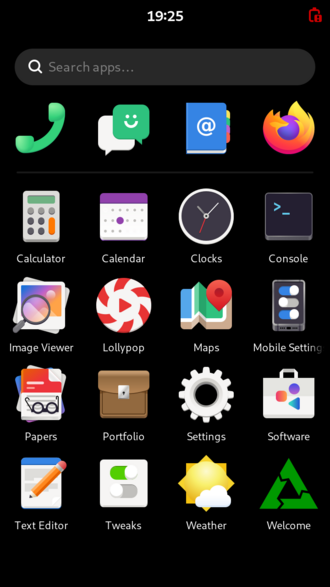
postmarketOS is not just another Android fork; it’s an ambitious project to create a true Linux distribution for mobile devices. By leveraging the ultra-lightweight Alpine Linux as its base, it aims to provide a decade-long life cycle for smartphones, transforming them from disposable gadgets into long-lasting, repairable computers.
A real Linux phone
Forget Android compatibility layers; postmarketOS runs a genuine Linux kernels where possible and gives full access to Linux software. This means you can use standard Linux package managers to install thousands of command-line and graphical applications from the Alpine repositories. It’s the ultimate choice for Linux purists who want a pocket-sized computer.
Choose your own interface
PostmarketOS offers a choice of mature, Linux-based mobile interfaces like GNOME’s Phosh and KDE’s Plasma Mobile. You can even opt for minimalist tiling window managers like Sxmo. This flexibility allows you to tailor the phone’s workflow to your exact preferences, something you just can’t do on mainstream mobile operating systems.
Release philosophy: stable or cutting-edge?
postmarketOS offers two channels. The edge channel is a rolling release, providing the latest software and features directly from the development branch. The versioned releases are fixed snapshots of edge that receive security and bug fixes, offering a more stable and tested experience. These versioned releases are supported until one month after the subsequent release.
Breathing new life into old hardware
A core mission of postmarketOS is sustainability. The project supports a vast array of devices, many of which are no longer supported by their manufacturers. If you have an old phone gathering dust in a drawer or about to go to the landfill, there is a chance that postmarketOS can give it a secure and functional life for years to come; that’s sustainability.
The trade-off
The power and philosophy come with a trade-off: app compatibility. You won’t be running popular Android apps here without significant effort if at all. postmarketOS is ideal for users who primarily rely on web apps, Linux-native software, and terminal utilities. It’s a platform for tinkerers, privacy advocates, and those who want to truly own their device.
If you envision your phone as a full-fledged, open, and repairable Linux computer, postmarketOS is one of the most compelling projects making that happen.
Pros
- True Linux distribution for phones, offering unparalleled customization and control
- Promotes sustainability by supporting old devices for years longer than manufacturers
- Strong focus on user privacy and security
- Choice between rolling release (edge) for latest features or stable releases for reliability
Cons
- Limited to no support for Android apps
- Hardware functionality can be incomplete depending on the device
- Requires a higher technical aptitude and a willingness to tinker
- Device support is not universal
/e/OS

Founded: France (2018)
Based on: LineageOS, Android
Desktop environment(s): Bliss, other launchers available
Backed by: small corporation (Murena)
Release cycle: semi-rolling
Support: semi-rolling
Homepage: https://e.foundation
Difficulty level: 🔵 🔵 ⚪ ⚪ ⚪ (beginner)
/e/OS is a privacy-focused mobile operating system that takes a different approach than some other mobile operating systems. Rather than building from scratch, /e/OS is forked from LineageOS, which itself is based on Android. This approach prioritizes app compatibility while still delivering significant privacy improvements.
Less big tech, more privacy
/e/OS aims to provide a deGoogled experience by removing all Google services and blocking trackers and privacy-invasive apps. The distribution includes its own cloud services, app store, and default applications that respect user privacy. This mobile distro really helps to remove big tech surveillance from one of your most personal devices.
Run Android apps
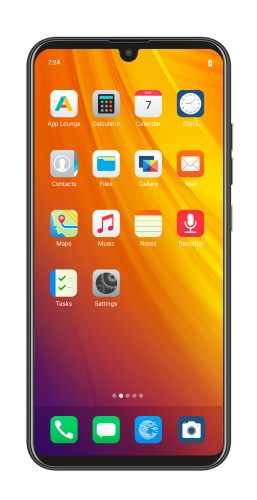
One of the biggest advantages of /e/OS is Android app compatibility. Most Android apps will work without issues, though some that rely heavily on Google Play services may have limitations. The /e/OS App Lounge provides access to both open-source applications and popular Android apps, and even includes privacy ratings to help you make informed choices on what apps to use.
Hardware compatibility
While not all phones and tablets are supported, /e/OS has good coverage of popular devices. The project maintains an active list of supported devices, and installation is generally more straightforward than other mobile Linux options. Many older devices that Google and manufacturers no longer support can still run current versions of /e/OS, extending their useful life significantly.
Privacy-focused ecosystem
Beyond the operating system itself, /e/OS provides its own ecosystem of privacy-respecting services. This includes Murena Cloud for file storage and synchronization, a privacy-focused web search engine, and curated app recommendations. The entire experience is designed to be a drop-in replacement for Google’s ecosystem without the tracking and data collection.
If you want improved privacy, security, and longer support for your mobile device while maintaining the ability to run most Android apps, /e/OS offers an excellent balance.
Pros
- Excellent Android app compatibility with most apps working out of the box
- Much better privacy and security than Android
- Complete privacy-focused ecosystem including cloud services
- Easier installation and setup than pure Linux mobile options
Cons
- Some Android apps that heavily rely on Google services may not work
- Still based on Android architecture, so not as fundamentally different as pure Linux options
- Smaller selection of supported devices compared to mainstream Android
GrapheneOS

Founded: Canada (2014)
Based on: AOSP (Android Open Source Project)
Desktop environment(s): Vanadium (Chromium‑based browser), stock Android UI
Backed by: community / small foundation
Release cycle: regular over‑the‑air updates, following Android security releases
Support: supported Pixel devices
Homepage: https://grapheneos.org
Difficulty level: 🔵 🔵 🔵 ⚪ ⚪ (intermediate)
GrapheneOS is a security‑hardened, privacy‑respecting Android‑based operating system. Unlike /e/OS, which aims for a user‑friendly deGoogled experience, GrapheneOS focuses relentlessly on exploit mitigations and defense against advanced threats—making it the go‑to choice for journalists, activists, and anyone facing elevated risk.
Security by design
GrapheneOS adds a wide array of hardening features to the Android base: a stronger SELinux policy, memory corruption defenses, verified boot, and a hardened kernel. It completely removes Google services by default but optionally allows installing a sandboxed version of Google Play Services, which runs with reduced privileges. Even apps that require Play Services can often run without compromising the core security model.
Limited device support
The project supports only Google Pixel devices, as they offer the necessary hardware security features. This narrow hardware scope is a trade‑off for the highest possible security baseline. If you don’t own a Pixel, GrapheneOS isn’t an option.
A more technical experience
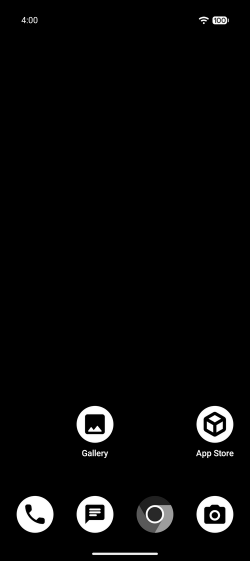
While the UI resembles stock Android, installing GrapheneOS requires using a web‑based installer and following precise instructions. Day‑to‑day use is smooth, but troubleshooting compatibility issues—especially with apps that insist on full Google Play Services—can require tinkering. It’s less “just works” than /e/OS, but the security payoff is enormous.
If your mobile device is part of your threat model and you want the most secure Android‑compatible system available, GrapheneOS is the benchmark.
Pros
- Best‑in‑class security hardening for Android
- Verified boot and hardware‑backed attestation
- Optional sandboxed Google Play Services for app compatibility
- Regular, prompt security updates
Cons
- Only supports Pixel devices
- More technical installation and maintenance than /e/OS
- Some apps may not function as expected without full Google Play Services
Ubuntu Touch (Ubuntu Mobile)
Founded: Isle of Man (2013)
Based on: Debian, Ubuntu
Desktop environment(s): Lomiri
Backed by: community
Release cycle: fixed, based on Ubuntu LTS releases
Support: up to 5 years
Homepage: https://ubports.com
Difficulty level: 🔵 🔵 🔵 ⚪ ⚪ (intermediate)
Ubuntu Touch is a mobile version of one of the most popular desktop Linux distributions. Initially developed by Canonical and later, in 2017, adopted by the community-driven UBports Foundation, it offers a unique, convergent experience that aims to seamlessly blend phone, tablet, and desktop computing into a single, unified operating system.
The original vision of convergence
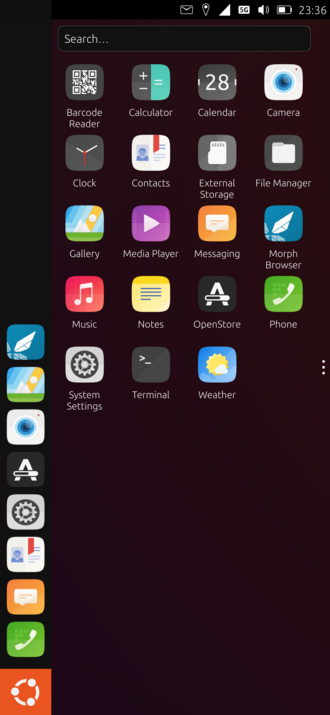
A key feature of Ubuntu Touch is its “convergence” capability. When connected to an external monitor, mouse, and keyboard, supported devices can transform into a full desktop computing experience, complete with a taskbar, windowed applications, and a familiar desktop interface. This vision of a single device for all your computing needs remains a key differentiator in the mobile Linux space.
A mature and stable core
Being based on the Ubuntu LTS releases, Ubuntu Touch benefits from a rock-solid foundation. The UBports community provides regular over-the-air updates that bring new features, improvements, and security patches, ensuring the system remains stable and secure. This focus on reliability makes it a quite user-friendly entry point into mobile Linux.
A curated, secure app ecosystem
Ubuntu Touch uses its own runtime for applications, providing a native, performant, and secure environment. While you won’t find the Google Play Store, the built-in OpenStore offers a growing repository of free and open-source apps designed specifically for the platform. For essential Android apps, the system includes a built-in, containerized Android compatibility layer (Waydroid) that can run many Android applications that don’t require deep system integration, though performance, battery life, and compatibility can vary.
Privacy by default
Following in the footsteps of its desktop sibling, Ubuntu Touch is designed with privacy in mind; it does not include any trackers. The system gives you clear control over application permissions for location, contacts, and more, ensuring you know exactly what your apps are accessing.
If you’re looking for a stable, user-friendly mobile Linux experience with a unique convergent feature set and strong privacy defaults, Ubuntu Touch is a fantastic option to consider.
Pros
- Unique ‘convergence’ feature turns your phone into a desktop computer
- Stable and reliable base thanks to Ubuntu LTS foundations
- Strong focus on user privacy and security out of the box
- User-friendly installation and OTA update process
Cons
- Native app selection, while growing, is smaller than Android
- Android app support via Waydroid is present but can be inconsistent
- Hardware support, while good, is not as extensive as Android-based alternatives
- Convergence only works on a limited subset of supported devices
Choosing the Right Mobile Linux Distribution
For Linux enthusiasts and tinkerers
postmarketOS is the clear choice if you:
- Want a “real” Linux experience on mobile
- Enjoy customizing and tweaking your system
- Primarily use web apps and Linux-native software
- Value complete control over your mobile computing experience
For privacy-conscious Android users
/e/OS is ideal if you:
- Want to escape Google’s ecosystem while keeping Android app compatibility
- Prefer a more polished, user-friendly experience
- Want privacy improvements without a steep learning curve
- Have a supported mainstream device
For security‑conscious Android users
GrapheneOS is for you if you:
- Face a heightened threat model (journalist, activist, legal professional)
- Want the absolute strongest Android security with no compromises
- Use a supported Google Pixel device
- Are comfortable with a more technical setup and occasional app compatibility challenges
For a convergent and user-friendly experience
Ubuntu Touch is a good bet if you:
- Are fascinated by the idea of one device that can be both your phone and desktop PC
- Prefer a stable, LTS-based system with straightforward over-the-air updates
- Want a privacy-respecting system that is relatively easy to install and use
- Primarily use web apps and Linux-native software with minimal use of Android apps
The Future of Mobile Linux
Mobile Linux distributions represent an important alternative to the Google and Apple duopoly. While they’re not yet ready to completely replace mainstream mobile operating systems for all users, they offer compelling advantages for those who value privacy, customization, and device longevity.
The ecosystem is rapidly improving. Hardware support is expanding, battery life optimizations are advancing, and app compatibility solutions are becoming more robust. More and more companies are creating purpose-built Linux mobile hardware, while projects like Waydroid are bridging the app compatibility gap.
Whether you choose postmarketOS for its pure Linux experience, /e/OS for its practical balance of privacy and compatibility, GrapheneOS for ultimate security, or Ubuntu Touch for its versatility and mobile/desktop convergence, you’ll be supporting a future where users have real choices in mobile computing.
Mobile Linux is a journey of learning and experimentation; while not for everyone, it can be a very rewarding experience.
Want a Hand With Your Setup?
Choosing a distro is step one—getting everything running smoothly and keeping it that way is another story. I help people build, secure, and maintain Linux systems that are private, sustainable, and truly their own.
Take a look at my support plans →
This post is part of a series on Choosing a Linux Distro:
- Which Desktop Environment?
- Rolling or Fixed Release?
- Community-Based or Corporate-Backed?
- Which Distro?
- Mobile Edition
- Server Edition
- The Cuts
Next in the series ➤➤ Server Edition